Automated App Categories based Targeting
The page guides user on the steps to target offers and bidders basis the standardized app categories
Overview
In today’s privacy-focused environment, understanding the context in which apps operate and the user personas interacting with them is crucial for maximizing campaign performance. App store categorizations often lack the necessary detail, leading to inefficient targeting and poor ad performance. To address this, we are excited to introduce Automated App Categories, a feature that offers a uniform, consistent, and granular classification of mobile apps across both the Playstore and App Store.
This feature leverages the data.ai API to automatically categorize apps into a three-level hierarchy of Type, Category, and Sub-Categories, covering 2 Types, 30 Categories, and 60 Sub-Categories. Apps are classified as either Gaming or Non-Gaming, providing deeper insights for advertisers and allowing more accurate and efficient ad targeting, better traffic reporting, and streamlined app management
App Category Taxonomy & Available App Count
Type
Categories
Sub-Categories
Number of Apps
| Gaming | Adventure | Adventure | 2,123 |
|---|---|---|---|
| Gaming | Arcade & Action | Action | 3,531 |
| Gaming | Arcade & Action | Arcade | 2,571 |
| Gaming | Board | Board | 1,080 |
| Gaming | Brain & Puzzle | Puzzle | 6,015 |
| Gaming | Brain & Puzzle | Casual | 5,548 |
| Gaming | Cards & Casino | Card | 1,326 |
| Gaming | Cards & Casino | Casino | 532 |
| Gaming | Education | Educational | 529 |
| Gaming | Music | Music | 429 |
| Gaming | Racing | Racing | 1,717 |
| Gaming | Role Playing & Strategy | Role Playing | 2,247 |
| Gaming | Role Playing & Strategy | Strategy | 1,798 |
| Gaming | Simulation | Simulation | 6,001 |
| Gaming | Sports | Sports | 1,054 |
| Gaming | Trivia | Trivia | 536 |
| Gaming | UNKNOWN | Games | 21,814 |
| Gaming | Word | Word | 916 |
| Non-Gaming | Art & Design | Art & Design | 313 |
| Non-Gaming | Art & Design | Graphics & Design | 68 |
| Non-Gaming | Books & Reference | Books & Reference | 840 |
| Non-Gaming | Books & Reference | Books | 177 |
| Non-Gaming | Books & Reference | Comics | 102 |
| Non-Gaming | Books & Reference | Reference | 89 |
| Non-Gaming | Books & Reference | Libraries & Demo | 25 |
| Non-Gaming | Business | Business | 166 |
| Non-Gaming | Education | Education | 1,173 |
| Non-Gaming | Entertainment | Entertainment | 3,433 |
| Non-Gaming | Entertainment | Events | 25 |
| Non-Gaming | Finance | Finance | 335 |
| Non-Gaming | Food & Drink | Food & Drink | 45 |
| Non-Gaming | Food & Drink | Food and Drink | 13 |
| Non-Gaming | Health & Fitness | Health & Fitness | 404 |
| Non-Gaming | Health & Fitness | Health and Fitness | 171 |
| Non-Gaming | Health & Fitness | Parenting | 45 |
| Non-Gaming | Lifestyle | Lifestyle | 912 |
| Non-Gaming | Lifestyle | Dating | 118 |
| Non-Gaming | Lifestyle | Beauty | 80 |
| Non-Gaming | Lifestyle | House & Home | 36 |
| Non-Gaming | Medical | Medical | 64 |
| Non-Gaming | Music | Music & Audio | 1,080 |
| Non-Gaming | Music | Music | 150 |
| Non-Gaming | News & Magazines | News & Magazines | 278 |
| Non-Gaming | News & Magazines | News | 104 |
| Non-Gaming | News & Magazines | Magazines and Newspapers | 3 |
| Non-Gaming | Photo & Video | Photography | 618 |
| Non-Gaming | Photo & Video | Video Players & Editors | 436 |
| Non-Gaming | Photo & Video | Photo and Video | 210 |
| Non-Gaming | Productivity | Productivity | 731 |
| Non-Gaming | Shopping | Shopping | 107 |
| Non-Gaming | Shopping | Auto & Vehicles | 77 |
| Non-Gaming | Social | Social | 369 |
| Non-Gaming | Social | Communication | 352 |
| Non-Gaming | Social | Social Networking | 184 |
| Non-Gaming | Sports | Sports | 439 |
| Non-Gaming | Tools | Tools | 2,840 |
| Non-Gaming | Tools | Personalization | 1,443 |
| Non-Gaming | Tools | Utilities | 412 |
| Non-Gaming | Tools | Developer Tools | 2 |
| Non-Gaming | Travel & Navigation | Maps & Navigation | 104 |
| Non-Gaming | Travel & Navigation | Travel & Local | 98 |
| Non-Gaming | Travel & Navigation | Navigation | 33 |
| Non-Gaming | Travel & Navigation | Travel | 25 |
| Non-Gaming | Weather | Weather | 227 |
Note: The app list categories is basis the feature released on 24th September 2024.
Advantages
-
Optimized Ad Spend: Tailor ad campaigns by targeting gaming and non-gaming apps, leading to better ROI.
-
Reliable Data Collection: Replaces manual crawlers with an automated API, reducing errors and failures.
-
Improved Reporting: More detailed app traffic reports categorized by app type, categories and sub-categories.
Step-by-step Instructions
-
Go to https://pokkt.com/login.html (opens in a new tab) and log in with your Admin credentials.
-
Locate the "Delivery" section in the left navigation bar and select "Targeting Profile" under "Targeting" sub-section .
-
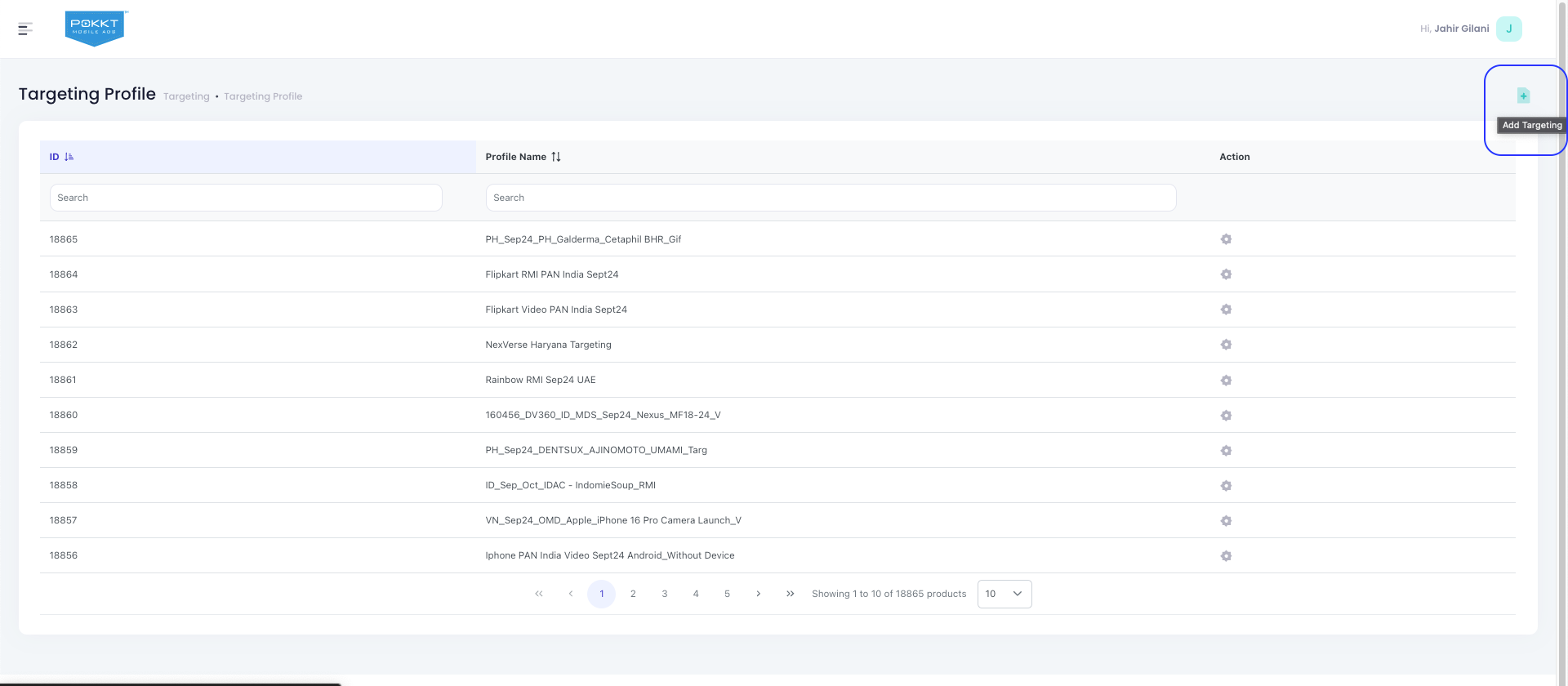
On the "Targeting Profile" page, click on "Create new targeting profile" button to create new targeting profile or create directly from Offer/Bidder creation page.
-
On the "Create Targeting Profile" page under "App Category" section, select the Type, Categories and Sub-Categories.

-
Once the app category is selected, the user should be able to see the number of apps that will be targeted basis the current category selection.

-
Once the targeting is updated, the user can save the targeting profile and tag it to the relevant Offer/Bidder.
FAQs
-
How often is the app category data updated? For new app bundles received from the SSP, the app category data will be updated within 24 hours of the bid request.
-
What happens if I don't select an app type in the App Category targeting? If no app type is selected, the system will disregard the app's category during targeting. The bid request will be processed without filtering by app type, allowing all apps to be included.
-
How often is the app category data for existing apps refreshed? The app category data for existing app bundles is refreshed every 3 months to ensure continued accuracy.