Device Price Targeting
This guide walks you through how to use Device Price Targeting in the POKKT DSP to reach users based on the Manufacturer’s Suggested Retail Price (MSRP) of their devices.
What is Device Price Targeting?
Device Price Targeting is an advanced targeting capability that allows you to define the audience based on the release MSRP (in USD) of a user’s device.
Instead of manually selecting individual device models (e.g., iPhone 15 Pro, Samsung S24 Ultra), you can simply define a price range. The platform automatically maps this range to eligible device models using trusted third-party data.
Why Use Device Price Targeting?
-
Reach users based on purchasing power (Premium, Mid-range, Budget).
-
Eliminate manual and error-prone device list creation.
-
Ensure premium ads are not shown on low-end devices.
-
Improve campaign efficiency and ROI.
-
Unlock budgets from brands that require price-based audience segmentation.
How Device Price Targeting Works
-
You define a minimum and/or maximum device price (MSRP in USD).
-
When the targeting profile is saved, the system stores the defined MSRP against the targeting profile of the offer.
-
During ad serving, the devices part of the ad requests are matched against the defined MSRP and based on that delivers the impressions, ensuring fast and efficient targeting.
How to Set Up Device Price Targeting: Step-by-Step Guide
Step 1: Navigate to Campaign Targeting
-
Log in to POKKT DSP using your credentials.
-
Create a new line-item or edit an existing line-item.
-
Scroll to the Targeting Profile section and add/edit the same.

- Scroll to the Device targeting category.
Step 2: Configure Device Price (MSRP) Targeting
-
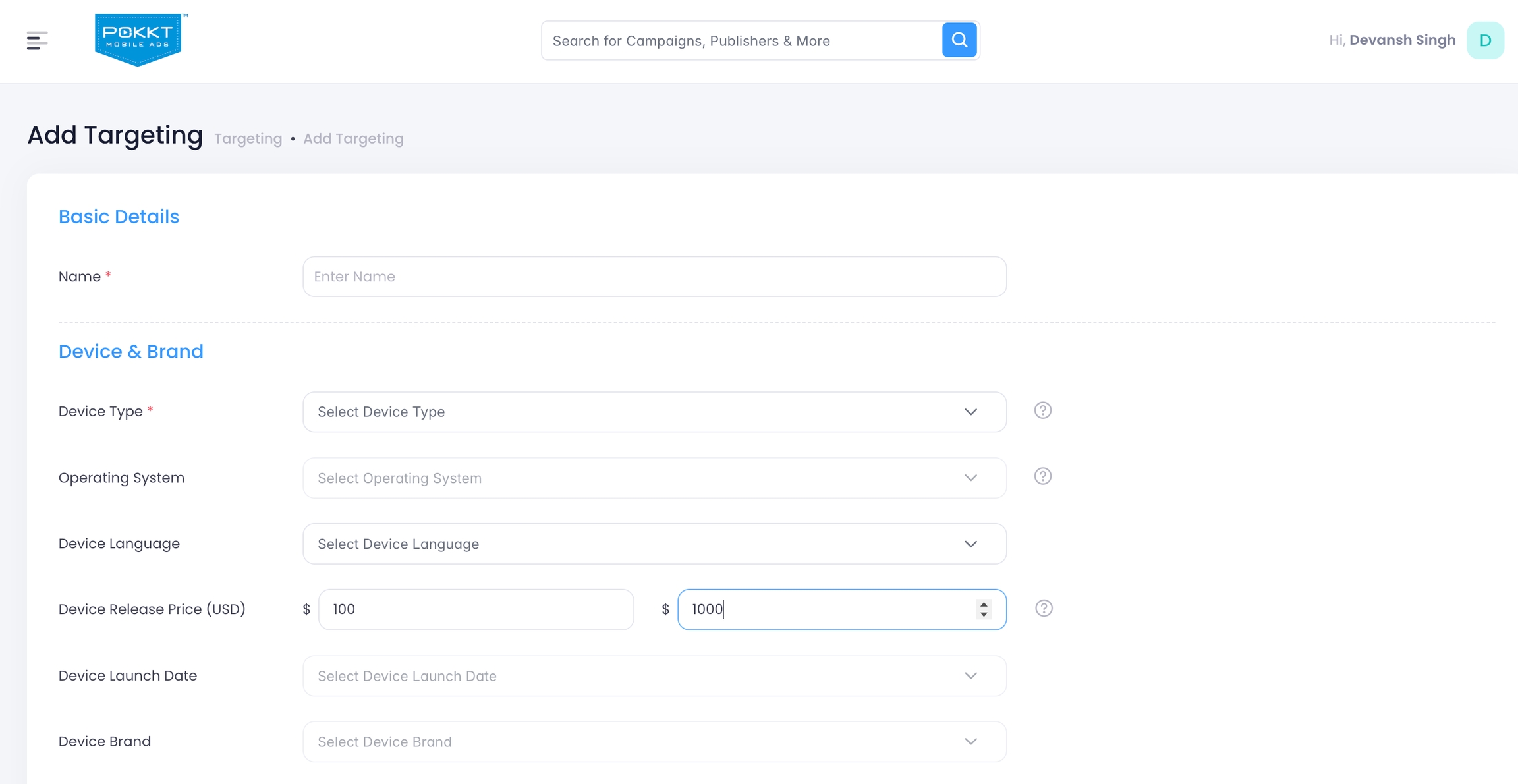
Within the Device section, locate the Device Release Price (USD) targeting option.
Set Price Range
-
Min Price (USD): Enter the minimum MSRP of devices you want to target.
-
Max Price (USD): Enter the maximum MSRP of devices you want to target.
Validation Rules:
-
Min Price must be less than or equal to Max Price.
-
You may set only Min or only Max if needed.
Example:
-
Min Price: 100
-
Max Price:
1000 -
This targets users with devices originally launched between $100 and $1000.
-
Step 3: Save Campaign
-
Review your targeting setup.
-
Click Save to finalize.
FAQs
-
Does Device Price Targeting use the device’s current market price? No. Device Price Targeting is based strictly on the release MSRP (Manufacturer’s Suggested Retail Price) of the device at launch. It does not consider:
-
Current resale value
-
Discounts or price drops
-
Regional market pricing
This ensures a consistent and standardized method for classifying device tiers.
-
-
What happens if I change the price range after the campaign is live? When you edit the price range and save the targeting profile again, the system updates the stored MSRP against the targeting profile of the offer and accordingly bids on the ad requests.
Note: The new targeting rules take effect within 60 mins after saving.
-
Can I target devices using currencies other than USD? No. Device Price Targeting currently supports USD only
-
Can I combine Device Price Targeting with Device Brand or Model targeting? Yes. Device Price Targeting works alongside existing Device Brand and Device Model targeting options within the Device section.